 Deutsch
 Français
 Italiano
 Nederlands
 Spanish

Tourist tax in the headline price: what the CMA's total price rule means for platforms
Trippz keeps tourist tax rates current for every destination you sell. Take a look at Trippz for Platforms to get started.Trippz keeps tourist tax rates current for every destination you sell. Take a look at Trippz for Platforms to get started.This post is the second in a four-part series on the CMA's pricing rules for travel and what they mean for booking platforms:
- The CMA's pricing rules for travel: what has to be in the total price
- (This post): Tourist tax in the headline price: what the CMA's total price rule means for platforms
- How to show a total price that includes local taxes
- Are platforms liable for pricing errors under the CMA rules, not just the seller?
Tourist tax in the headline price: what the CMA's total price rule means for platforms
Tourist tax belongs in the first price a UK customer sees. The CMA's guidance under the Digital Markets, Competition and Consumers Act 2024 requires the total price shown upfront to include every fee, tax, or charge the customer will necessarily incur, and it names local charges and taxes as costs that are normally calculable in advance. For any stay in a destination that levies tourist tax, the tax sits inside the headline price from the first moment a price appears. The full pricing regime is covered in our overview of the CMA's pricing rules for travel.
Why tourist tax falls under the rule
The rule covers any fee, tax, or charge the customer will necessarily incur, provided it can be calculated in advance. Tourist tax meets both parts of that test. It applies automatically at the destination, the guest cannot decline it, and municipalities publish the rates that determine it. The CMA allows an exception where calculating the total in advance is truly impossible, and it has said it expects that exception to apply rarely. A published municipal rate leaves little room to invoke it.
Where the complete price has to appear
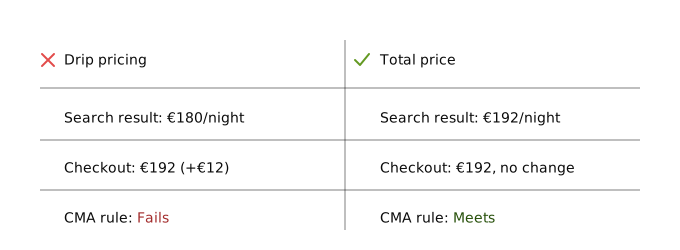
The obligation attaches to every invitation to purchase, and the CMA reads that term broadly. Search results, listing pages, app banners, and the shopping basket all qualify. The tourist tax therefore has to be inside the price from the first search result onward. A line item added at checkout, or a note that local taxes may apply, fails the rule. Partitioned pricing, where the tax appears as a separate charge without a clear total upfront, falls under the same prohibition.
Knowing every rate before the price renders
This is where the compliance work sits for a booking platform. A platform selling stays across hundreds of destinations has to know the applicable tourist tax for each of them at the moment a search result renders. Rates are set locally and follow no common structure. Some cities charge a percentage of the accommodation price, others a fixed amount per person per night. Exemptions for children, caps on the number of taxed nights, and seasonal variations differ from one municipality to the next. Rates change without warning, and a rate that was correct when a page was built produces a wrong total the day the municipality adjusts it. Monitoring every jurisdiction is a full-time job in itself.
Enforcement has started. In April 2026 the CMA issued its first fine under the new regime, against the AA's driving schools, over a mandatory booking fee that appeared too late in the purchase journey. The fee was £3. The fine was £4.2 million.
Keeping the headline price right
Trippz counts Airbnb, Booking.com, and Expedia among its clients. Getting the headline price right at scale is a data problem: the price engine needs the current rate for every destination before it can display a compliant total. The LocationTax API is built for that step. Send a location, receive the applicable rate, updated automatically when a municipality changes it. Trippz maintains and automatically updates tourist tax rates across 70+ countries, with every jurisdiction monitored and updates pushed automatically, and the service is SOC 1 Type 2 and SOC 2 Type 2 certified and GDPR compliant. More on how the underlying data works in what is a tourist tax API. A step-by-step guide to building the compliant price display is in how to show a total price that includes local taxes.
Trippz keeps tourist tax rates current for every destination you sell. Take a look at Trippz for Platforms to get started.